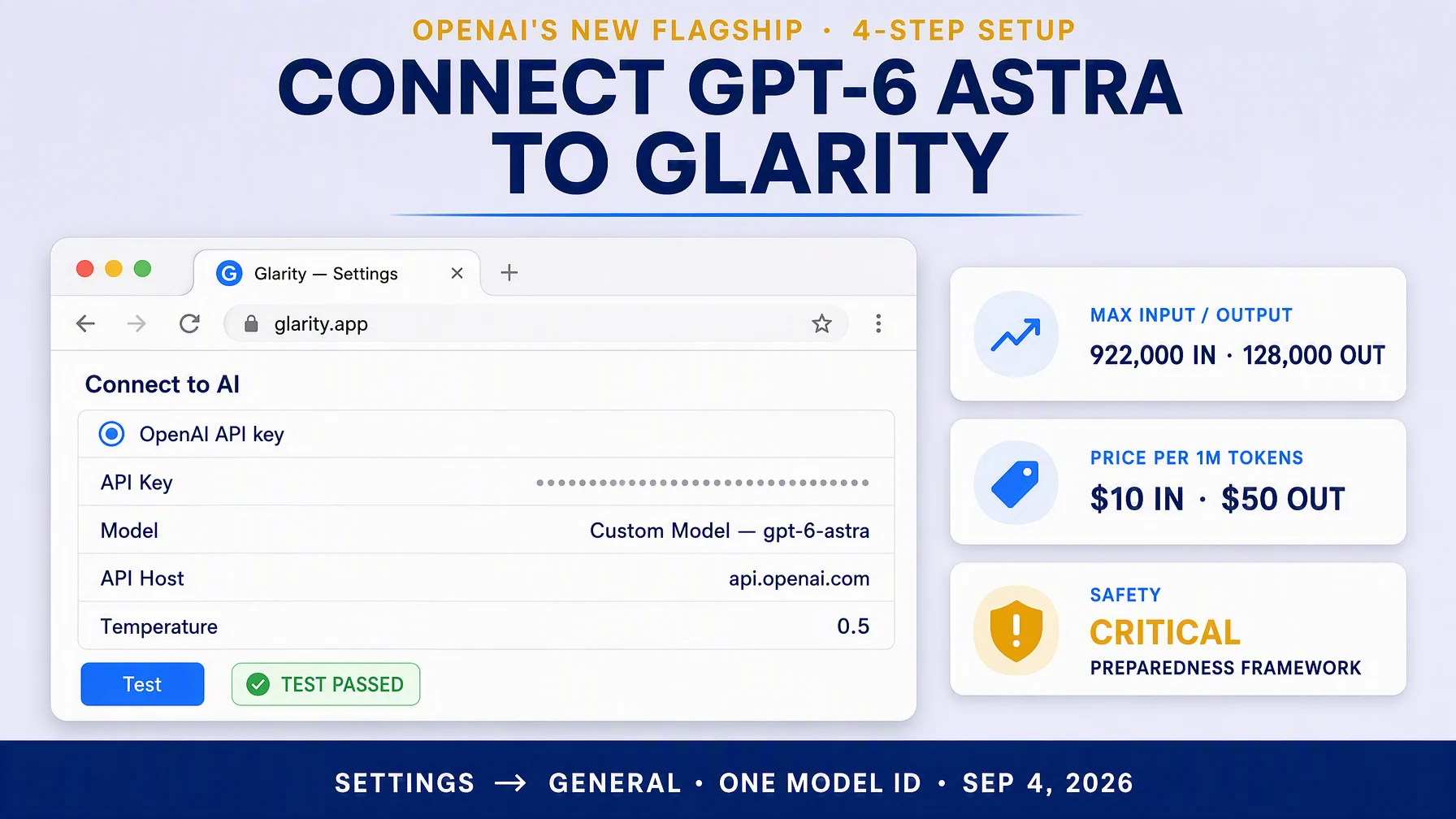
OpenAI announced GPT-6 Astra on September 3, 2026 — a frontier model it calls "the world's most intelligent and aligned model," and the first model rated at the Critical threshold of its Preparedness Framework. Connecting it to Glarity is a four-move job: pick OpenAI API key, paste your key, type one model ID (gpt-6-astra) into Custom Model, and keep the default host (api.openai.com). That's it — pages, YouTube videos, and subtitles then run on GPT-6 Astra. Two honest caveats before you start: the model is rolling out to enterprises first, so your account may not have it enabled yet; and with no free tier documented, this is a premium model whose cost per session really matters.
GPT-6 Astra: a quick spec sheet
Field | Value |
|---|---|
Model ID |
|
Context window | 1,050,000 total — 922,000 input, 128,000 output |
Knowledge cutoff | April 30, 2026 |
Input | text, image (no audio or video) |
Output | text |
Reasoning effort | low / medium / high / xhigh / max |
API routes | Chat Completions |
Pricing | $10 / 1M input, $50 / 1M output; cached input $1 / 1M (cache writes $12.50) |
The details above come from OpenAI's API model page. The announcement adds two things worth knowing before you decide. First, OpenAI's own long-context evaluation (MRCR v2) shows 100.0% needle recovery at 256K–512K and 96.3% at 512K–1M — internal numbers, not a third-party verdict, but they describe what products like Glarity actually do: load a whole document and hold it. Second, GPT-6 Astra also tops OpenAI's internal coding and computer-use evals (DeepSWE v1.1 74.1%, HLE with tools 57.2%), which is why the same model that summarizes your reading can draft a proper reply to an email about it.
Why this model fits Glarity
Glarity's daily jobs are reading jobs: summarize a page, translate a page, turn a one-hour YouTube video into notes, answer questions about a document. GPT-6 Astra's 922,000-token input window swallows a 300-page book — or a full semester's lecture transcripts — in one request. There's no chunking, no "sorry, too long," and the model sees the beginning and end at the same time, so a whole-book summary doesn't read like a chain of section notes. The image input is a bonus: paste a screenshot or a chart and ask about it in the same conversation. The text-only output is all a summarizer needs — Glarity never asked its best model to paint.
The catch is present too: this is a $10-per-million-input model, roughly the price tier of a reasoning flagship. So the rest of this article is about two questions: can you access it yet, and what does each session actually cost?
First, check your access
GPT-6 Astra is not available to every OpenAI account today — and the rollout is the single most common reason a first attempt fails.
- According to the API documentation, GPT-6 Astra is rolling out today for enterprises in OpenAI's Trusted Access Program, with ChatGPT Plus, Pro, Business, and Enterprise plan access following.
- The announcement says the same: a limited set of organizations first, then subscribers, the API, and AWS Bedrock.
- Enterprise access is off by default at launch — an admin has to enable the model.
- There is also a Pro variant (
gpt-6-astra-pro) for Pro, Business, and Enterprise plans. The plaingpt-6-astraAPI model is what you connect here.
So before tailoring anything, run the Test button with an empty setup. If it returns "model not found", the model isn't on your account yet — wait for your rollout window, or ask your workspace admin. If you're on a ChatGPT plan, the announcement says usage counts against your existing plan allowance through the ChatGPT apps; through the API, every call is billed per token.
Connect it in four steps
Open Glarity, go to Settings → General, scroll to Connect to AI for quick Glarity summaries and translations, and:
- Select "OpenAI API key" (GPT-6 Astra is an OpenAI model — no custom endpoint needed).
- Paste your OpenAI API key into the API Key field.
- Model — choose Custom Model and type
gpt-6-astraexactly. If the dropdown already lists GPT-6 Astra, just pick it. - Set Temperature to 0.5 (drop to 0.2 if you want literal, word-level translation), press Test, then Save.
Two fields stay at their sensible defaults, but check them once. API Host should read api.openai.com; API Path should read /v1/chat/completions. (If a previous setup left a third-party host here, change it back — that is also the fix when Test returns a connection error instead of a model error). Model Context Window: pick the largest preset available — the model caps requests at 922,000 input tokens anyway, and the preset is only a safety ceiling.
That's the whole setup: four actions, one ID, no third-party endpoint.
What a session really costs
At $10 per million input tokens, a single request is cheap until it isn't. Here's the math for the sessions Glarity users actually run — round estimates, actual token counts vary by language and page complexity:
What you feed it | Tokens in | Tokens out | Approx. cost |
|---|---|---|---|
1-hour YouTube video → summary | ~12,000 | ~800 | ~$0.16 |
30-page report → summary + chat | ~40,000 | ~1,500 | ~$0.48 |
300-page book → whole-book summary | ~230,000 | ~3,000 | ~$2.45 |
Big research stack (>272K input) | ~500,000 | ~8,000 | ~$10.60 |
The last row is where the pricing page deserves respect: prompts with more than 272K input tokens cost 2x the input rate and 1.5x the output rate for the full request. One enormous request is roughly a day's worth of small ones. The counterbalance is the cached input price: at $1 per million, follow-up questions on a document you already read cost pennies — the model's long context makes a doc cost-heavy the first time and nearly free after that.
When to use it — and when to skip
Use GPT-6 Astra in Glarity when the answer is worth more than the click: whole-book summaries, research paper stacks, hour-plus lectures, nuance-critical translation and proofreading of professional text, and emails drafted from what you just read. That is exactly the scenario set where the 96.3% long-context score and the reasoning budget show up in the output.
Skip it for the daily grind of quick pages: translating 20 short pages, skimming a news article, checking what a changelog says. Those sessions cost proportionally more than a smaller model and return nothing extra. Glarity's cheaper lane is the Flash class — see our Gemini 3.8 Flash setup guide for a per-milli-cent setup. A good rule: GPT-6 Astra is for the reading you'd otherwise print; a Flash-class model is for the reading you scroll.
If something fails
Symptom | Likely cause | Fix |
|---|---|---|
Test returns 401 | Wrong or pasted-with-spaces key | Regenerate the key in your OpenAI dashboard; paste over the field |
"Model not found" | The rollout hasn't reached your account | Wait for your window, or enable via admin — see the access section |
Connection error on Test | Wrong host from an earlier setup | Set API Host to |
429 or rate limit | Tiered rate limits on your key | Wait a moment; checkout-tier upgrades raise the limits |
Long requests rejected | Request exceeded 922,000 input tokens | Split the document once — one 500K request can be rare, but 1M-class jobs can't fit |
FAQ
Is GPT-6 Astra free? No — no free tier is documented for the API, and the announcement only mentions allowance-based usage inside ChatGPT plans. In Glarity, every API call bills per token; budget for it.
Why does the model ID matter, can't I just pick it in the dropdown? The dropdown may lag the rollout. If GPT-6 Astra isn't listed, Custom Model + gpt-6-astra is the correct way — and the connection still uses OpenAI's official endpoint.
Does this replace my Google or other-model setup? No — Glarity's "Connect to AI" runs one configuration at a time. Switching from a different provider means updating the model field, the API key, and the host, so keep both credentials handy; switching between models on the same endpoint is still a one-field change.
How big is a 300-page book in tokens? Roughly 200–260K tokens depending on the language — inside the 922K window, but you may hit the 272K threshold only with several books in one request.
Would GPT-6 Astra change how Glarity translates? Translation quality is the same pipeline — the model choice changes how well it holds the context of a long document in both languages. For strict, literal, sentence-by-sentence translation, keep the temperature at 0.2.
Glarity's editorial team covers AI search, video summarization, and browser productivity tips.
Glarity is a free browser extension for AI search, YouTube video summaries, and page translation — available at glarity.app.