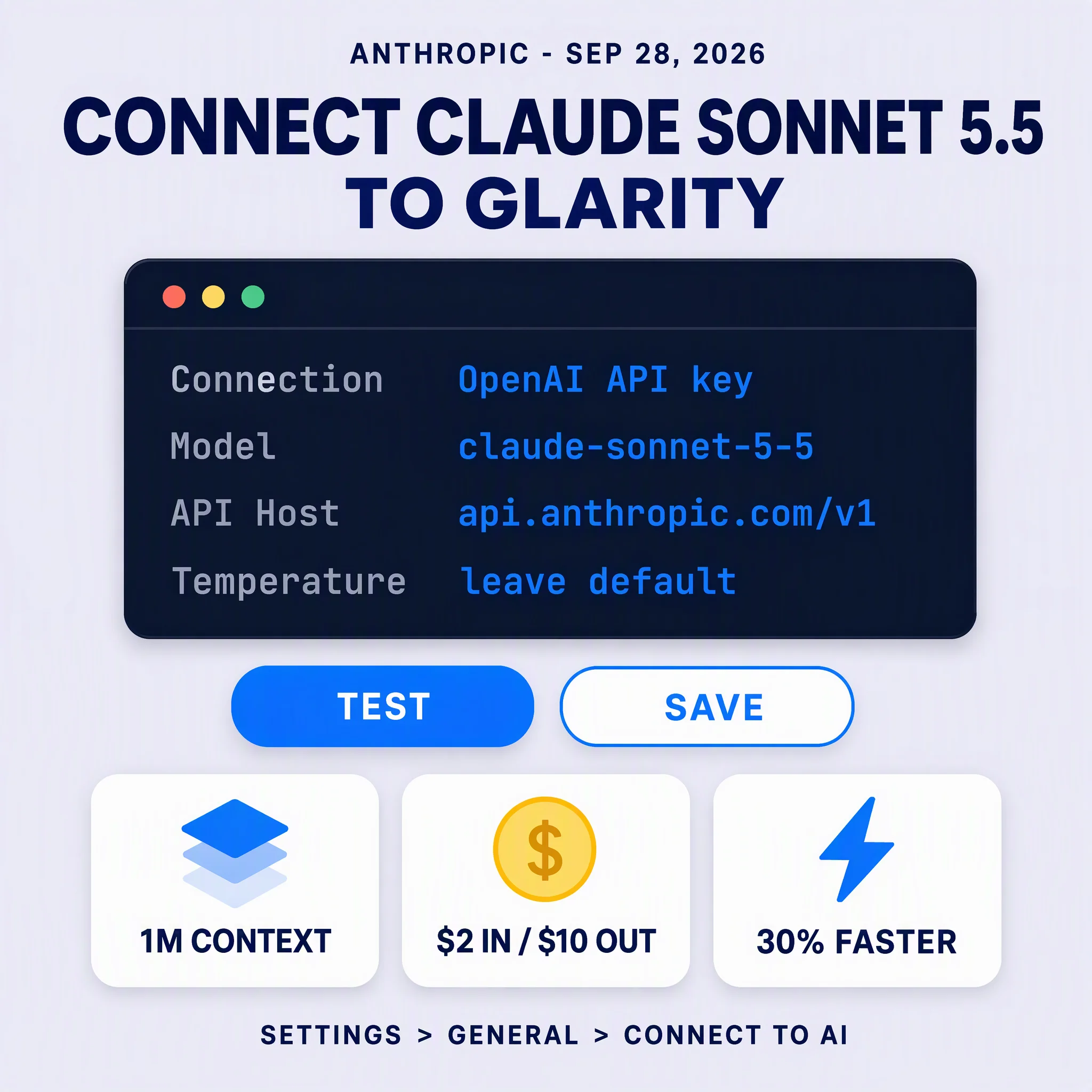
Anthropic released Claude Sonnet 5.5 on September 28, 2026 — the second model in its 5.5 family and, at $2 per million input tokens and $10 per million output tokens, the same price as the Sonnet 5 it replaces. What you get for that unchanged price is output that comes back 30%+ faster and, because it uses fewer tokens to reach the same answer, up to 30% less cost per task. Connecting it to Glarity is four moves: select OpenAI API key (the entry Glarity uses for Anthropic too, through Anthropic's OpenAI-SDK compatibility layer), paste your sk-ant- key, type claude-sonnet-5-5 into Custom Model, and leave the host at https://api.anthropic.com/v1. One thing has changed since our earlier Claude guides, and it will bite you if you follow them literally: do not fill in the Temperature field. Anthropic's Sonnet 5.5 model page states that a non-default temperature returns an error. Details below.
Claude Sonnet 5.5: a quick spec sheet
Field | Value |
|---|---|
Model ID |
|
Released | September 28, 2026 — retirement not sooner than September 28, 2027 |
Context window | 1M tokens — roughly 555,000 words on the current tokenizer |
Max output | 128K tokens (300K on the Batch API with a beta header) |
Knowledge cutoff | June 2026 |
Input → output | Text and images → text |
Thinking | Adaptive, on by default — steered by effort; default |
Pricing | $2 / 1M input, $10 / 1M output; cache writes $2.50 (5 min) and $4 (1 hr); cache reads $0.20 / 1M |
Speed | 30%+ faster output than Claude Sonnet 5, at the same per-token price |
The specifications come from Anthropic's model page and its announcement. The announcement's own numbers are what make the upgrade case: on Terminal-Bench 4.0 Sonnet 5.5 scores 70.6%, against 10.3% for Sonnet 5 and 66.4% for Claude Opus 5.5; on GDPval-AA v2.1, which measures real-world work across 44 occupations, it scores 1844 — roughly two points behind Opus 5.5's 1846 and about 400 points ahead of Sonnet 5's 1449. It also posts 80.1% on OSWorld 2.1, 64.5% on Humanity's Last Exam with tools, and 55.5% on CursorBench 4.0, and it is the first Sonnet model to finish Pokémon Red working only from screenshots. Those are Anthropic's internal evaluations, not third-party verdicts — but the honest framing matters: Anthropic states plainly that Opus 5.5 remains clearly stronger at complex, open-ended work requiring sustained judgment. Sonnet 5.5 closes most of the gap at a fifth of Opus's price; it does not erase it.
Why this model fits Glarity
Glarity's daily work is reading work: summarize a page, translate a page, turn an hour-long YouTube video into notes, ask questions about a document you are looking at. Three Sonnet 5.5 properties land directly on that:
- It is fast. A summarizer is judged on how long the panel sits empty. 30%+ faster generation is the difference between a summary you wait for and one that is simply there.
- It is token-efficient. Because Glarity connects to Anthropic through the OpenAI-compatible layer, and that layer does not support prompt caching, every turn re-bills its full input. A model that reaches the same answer with fewer tokens is not a marginal saving here — it is the whole cost structure.
- Its window is bigger than your document. 1M tokens covers a 300-page book in a single request, so the model sees the beginning and the end at once instead of stitching together section notes.
Sonnet 5.5 also takes image input, which matters for a browser extension: translate or explain a chart, a scanned page, or a screenshot without leaving the tab.
What changed since our Sonnet 5 guide
If you already followed our Claude Sonnet 5 setup guide, three changes are worth knowing. Only the first affects Glarity users directly.
1. Non-default sampling parameters now return an error. Anthropic's Sonnet 5.5 model page lists this under "Good to know": setting temperature, top_p, or top_k to a non-default value returns an error. That reverses the advice in every earlier Claude guide on this blog, which told you to set Temperature to 0.5 — or 0.2 for strict literal translation. On Sonnet 5.5, leave Temperature alone. If you already have a working Sonnet 5 setup, changing only the model ID is correct; changing the model ID and re-applying 0.5 is how you get a wall of red.
2. Thinking-off has a new name. On Sonnet 5 you could send thinking: disabled. On Sonnet 5.5 that request returns an error pointing you to between_tools instead. You will never send either parameter through Glarity — the extension does not expose thinking controls — so this only matters if you maintain your own Claude integration. Through Glarity, adaptive thinking runs at its default high effort and there is nothing to configure.
3. The safety layer is new for a Sonnet. Sonnet 5.5 is the first Sonnet model to launch with cyber safeguards and fallbacks comparable to Opus-class releases, and the first with classifiers that block reasoning-extraction attempts. In practice: a request that could enable cyber harm may be declined, and Anthropic's server-side fallback for those categories retries the request on Claude Sonnet 5. For a summarizer this is mostly background noise, but it is worth knowing if you use Glarity on security research or offensive-tooling material — you may occasionally see a Sonnet 5-flavoured answer, or a decline, where an older Claude model would have simply answered.
Connect it in four steps
Open Glarity, go to Settings → General, scroll to Connect to AI for quick Glarity summaries and translations, and:
- Select "OpenAI API key" — this entry works for Anthropic, because Anthropic publishes an OpenAI SDK compatibility layer that accepts OpenAI-format requests.
- Paste your Anthropic API key into the API Key field. Keys start with
sk-ant-and come from the Claude Console. An OpenAI key will not work here. - Model — choose Custom Model and type
claude-sonnet-5-5exactly. If the dropdown already lists Claude Sonnet 5.5, pick it — the ID is the contract either way. - Leave Temperature at its default, press Test, then Save.
Two fields stay at their documented defaults, but check them once. API Host: https://api.anthropic.com/v1 — the exact base URL from Anthropic's own compatibility quick starts; API Path: /chat/completions. If an earlier setup left another provider's host in there, change it back — that is also the fix when Test returns a connection error rather than a model error. Model Context Window: pick the largest preset; the 1M model ceiling is the real limit and the preset is only a safety ceiling.
What a session really costs
At $2 per million input tokens, Sonnet 5.5 is five times cheaper per token than Claude Fable 5.1. Here is the same session table we ran for that model, priced at Sonnet 5.5's rates — round estimates; actual token counts vary by language and page complexity:
What you feed it | Tokens in | Tokens out | Approx. cost |
|---|---|---|---|
1-hour YouTube video → summary | ~12,000 | ~800 | ~$0.03 |
30-page report → summary + chat | ~40,000 | ~1,500 | ~$0.10 |
300-page book → whole-book summary | ~230,000 | ~3,000 | ~$0.49 |
Big research stack (roughly 500K input) | ~500,000 | ~8,000 | ~$1.08 |
Same stack under Claude Fable 5.1 | ~500,000 | ~8,000 | ~$5.40 |
Two things to read off that table. First, the everyday rows are rounding errors — a video summary is three cents, and a week of heavy reading on this model costs less than a sandwich. Second, the cost difference between Sonnet 5.5 and Sonnet 5 is not in this table at all: they share the same published rates. The saving is that Sonnet 5.5 needs fewer tokens to finish the same task — up to 30% fewer, per Anthropic — and because the compatibility layer re-bills full input on every turn, that efficiency is exactly where your money goes.
The caveat is unchanged from our Fable 5.1 guide: the compatibility route does not support prompt caching. The advertised $0.20 cache-read rate applies to applications using Anthropic's native API. Through Glarity, a multi-turn conversation about a 230K-token book re-bills the whole book on each follow-up. Ask everything you want to ask in one well-formed request and the $0.49 stays a single-serving number.
When to use it — and when to skip
Use it as your default Claude lane. This is the rare upgrade with no trade-off attached: same price as Sonnet 5, faster, fewer tokens per task, and better on every evaluation Anthropic published. If you are currently connected to claude-sonnet-5, changing that one field to claude-sonnet-5-5 is the highest-value five seconds in this article.
Reach for it on long documents, multi-hour transcripts, translation where tone and terminology have to survive intact, and any session where you would otherwise print the source and read it on paper.
Skip it in two situations. If your sessions are short and casual — a paragraph here, a quick page skim — a Flash-class model costs a fraction of this and the quality difference will not show. And keep Claude Fable 5.1 in reserve for the work that genuinely needs sustained judgment on open-ended problems: at $10 / $50 per million it is five times the price, and Anthropic's own guidance is to move up a tier only when a cheaper model's output falls short. For nearly everything Glarity does, Sonnet 5.5 is where that line now sits.
Switching between Claude models is a one-field change — Glarity's "Connect to AI" runs one configuration at a time, so from Sonnet 5.5 to Fable 5.1 you edit the model name and nothing else.
If something fails
Symptom | Likely cause | Fix |
|---|---|---|
Test returns 400 right after you set Temperature | Sonnet 5.5 rejects non-default sampling parameters | Clear the Temperature field back to its default and Test again |
Test returns 401 | Wrong key, or an OpenAI key in the field | Create a key in the Claude Console (starts |
"Model not found" | Typed ID isn't the exact model | Type |
529 or "Overloaded" | Anthropic's own overloaded error | Wait a moment and retry — the compatibility layer passes Anthropic's status codes through |
Connection error on Test | Wrong host from an earlier setup | Set API Host to |
429 or rate limit | Usage-tier RPM/TPM limits on your key | Wait; request a limit increase in the Console |
Long request rejected | Over the 1M-token window | Split the document; 1M tokens is roughly 555,000 words on the current tokenizer |
FAQ
Is Claude Sonnet 5.5 free? No — every call bills per token. Anthropic's pricing FAQ notes that new accounts receive a small amount of free credits for testing, which covers a handful of sessions at most. Budget for what you actually read; on this model that budget is small.
Why do some model lists show it as `anthropic/claude-sonnet-5.5`? That is a provider-prefixed display name used by model directories. The ID the Claude API itself accepts is claude-sonnet-5-5 — no slash, no dot. Type that into Custom Model.
Should I switch from Claude Sonnet 5 if I'm happy with it? Yes. The price is identical, the output is faster, and the token efficiency means the same session costs less. There is no scenario where staying on Sonnet 5 saves you money — that is not the usual shape of a model upgrade, and it is worth taking advantage of.
Will it refuse my security-related summaries? It can. Sonnet 5.5 is the first Sonnet with frontier-style cyber safeguards, so requests that could enable cyber harm may be declined or fall back to Claude Sonnet 5 under Anthropic's server-side fallback. Ordinary security reading — advisories, incident reports, policy documents — is unaffected.
Does this replace my Fable 5.1 setup? It replaces it for most sessions. Fable 5.1 is the tier above; keep both credentials and switch by editing the model field when a task genuinely needs more sustained reasoning than Sonnet 5.5 delivers.
What should I set Temperature to for translation? Leave it at Glarity's default. The 0.2 setting from our earlier Claude guides predates Sonnet 5.5's parameter change and will likely fail the Test step.
By the Glarity Editorial Team. The Glarity Editorial Team writes about AI search, video summarization, and getting more out of your browser.
Glarity is a free browser extension for AI search and YouTube summarization — try it at glarity.app.