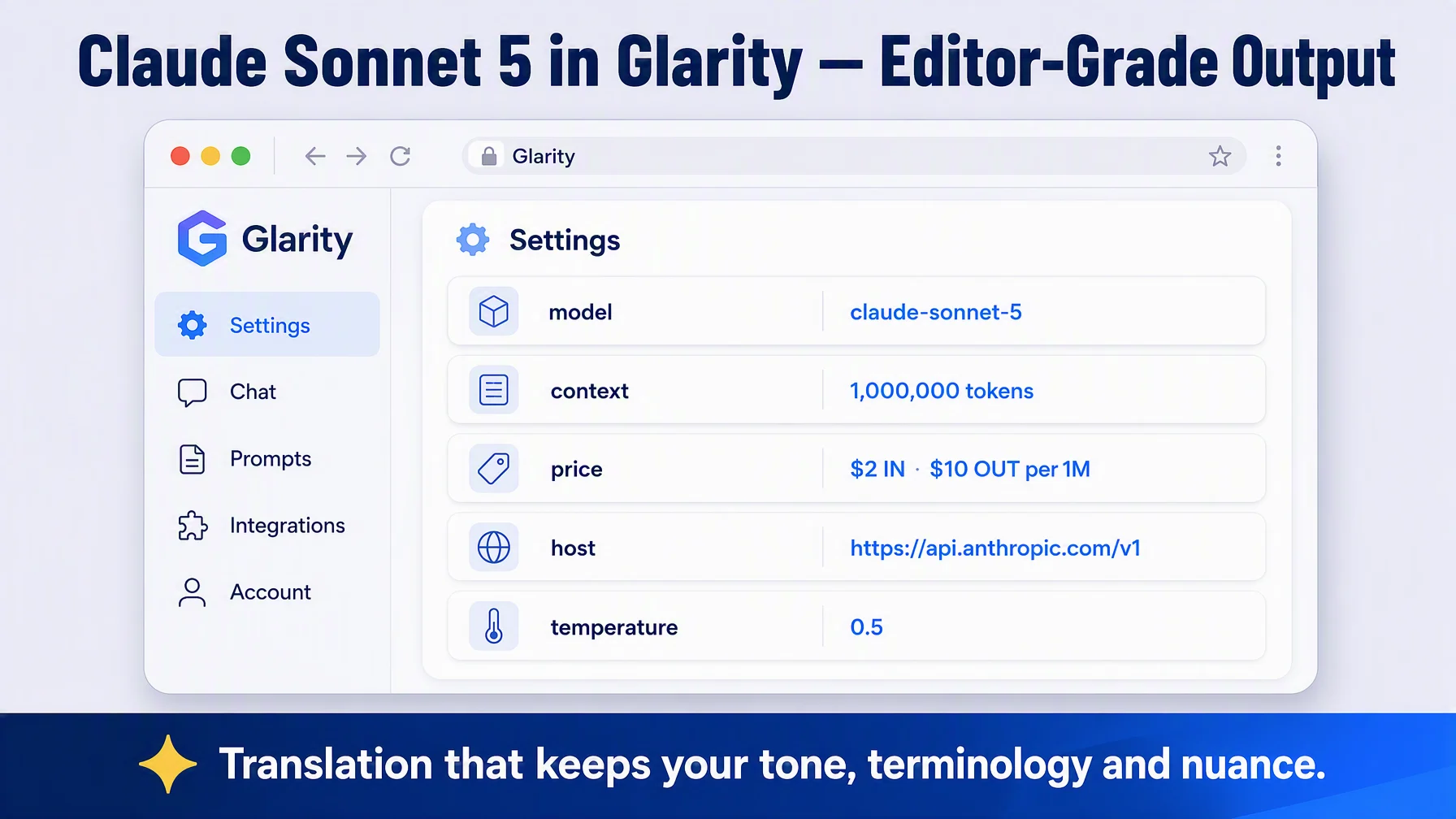
If you want your page translations and summaries to read like a careful editor wrote them, Claude Sonnet 5 is a strong choice — and you can plug it into Glarity in about five minutes. In Settings → General, choose OpenAI API key, paste an Anthropic API key, then set the model name, context window, API host and path using Anthropic's official OpenAI-compatible endpoint. Every translation and summary then runs on Claude Sonnet 5.
Why Claude Sonnet 5
Claude Sonnet 5 (announced June 30, 2026) is Anthropic's most agentic Sonnet yet, and the default model across Free and Pro plans. Anthropic positions it as the best combination of speed and intelligence: its performance is close to Opus-class models at far lower prices, and it excels at the multilingual, long-context work Glarity lives on — nuance in tone, faithful technical terms, and long documents.
A useful property for an extension: Sonnet 5's adaptive thinking is always on, and its quality holds up without you tuning anything. And because prices were made permanent in August 2026, the rate you see today is the rate you get.
Connecting through Anthropic's OpenAI-compatible endpoint
Glarity's OpenAI API key option speaks OpenAI's Chat Completions format. Anthropic provides an official compatibility layer for exactly this: point it at the Claude API base URL, use your Anthropic key, and use Claude model names. That's what we'll fill in below. Note that Anthropic describes this layer as primarily for evaluating and testing models — for a third-party client like Glarity it works well, and Anthropic expects it to stay functional, but the native Claude API remains the feature-complete path.
What you need: an API key from platform.claude.com (the official Anthropic developer console).
Configure Glarity step by step
Open Settings → General and scroll to Connect to AI for quick Glarity summaries and translations.
- Select "OpenAI API key".
- Paste your Anthropic API key into the API Key field. (Anthropic keys start with
sk-ant-.) - Model — choose Custom Model and enter
claude-sonnet-5. (The same key can be used for other models such asclaude-opus-5by editing this field.) - Model Context Window — pick the preset nearest to 1,000,000 tokens (Sonnet 5's official context window, about 555k words of English).
- API Host —
https://api.anthropic.com/v1(the Claude API base used in Anthropic's own OpenAI-SDK examples). - API Path —
/chat/completions(the Chat Completions route of that base). - Temperature — 0.5. The compatibility layer accepts 0–1, so 0.5 lands right in range.
- Test, then Save.
Settings at a glance
Field | Value | Meaning |
|---|---|---|
Connection | OpenAI API key | via Anthropic's official compatible endpoint |
Model | Custom Model — | Speed + intelligence flagship Sonnet |
Model Context Window | 1,000,000 tokens (preset as available) | Official 1M-token window |
API Host |
| Claude API base (OpenAI-SDK example) |
API Path |
| Chat Completions route |
Temperature | 0.5 | Within the 0–1 range the layer accepts |
Pricing in context
Per Anthropic's pricing: $2 per 1M input tokens and $10 per 1M output tokens (made permanent August 10, 2026 — a steep discount to Opus's $5/$25). Max output is 128k tokens. A typical Glarity call — one page summary or one transcript — uses a fraction of a million token, so daily use on one or two hours of reading usually stays under a dollar. Check the official page for current tiers and Batch discounts.
What a Sonnet-powered Glarity can do
Capability | How it behaves now |
|---|---|
Translation | Immersive page translation and side-by-side bilingual subtitles — full walkthrough in the bilingual subtitle tutorial |
Page summary | Structured summaries with faithful terminology and tone |
YouTube summary | Timestamped highlights and FAQs from full transcripts |
Video subtitles | Subtitles generated and translated into your language |
Quick email reply | The tone follows your instructions closely |
One-click prompts | Saved tasks re-run on your own model |
Troubleshooting
- Test returns 401 — the key is wrong or expired. Recreate it at platform.claude.com and paste again (keys start with
sk-ant-). - "Model not found" — check the exact spelling
claude-sonnet-5. - Only one answer returned? — the compatibility layer always returns a single choice; that's expected, not an error.
- Thinking/reasoning output looks stripped — the OpenAI-compatible layer does not return Claude's detailed reasoning; the final answer itself is unaffected.
- Nothing changes after saving — confirm you pressed Save after Test.
FAQ
Can I really use Sonnet 5 in Glarity if Anthropic's API isn't OpenAI-formatted? Yes — Anthropic ships an official compatibility layer at https://api.anthropic.com/v1/ that accepts Chat Completions requests; you just use a Claude model name and an Anthropic key.
Does it handle translation or only summaries? Both. The connected model powers Glarity's page translation, selection translation, subtitle translation, and summaries.
Is the $2/$10 rate permanent? Anthropic announced in August 2026 that the original introductory pricing is now permanent — still, check the official pricing page, since rates can change.
Why would I pay more than for a cheap model? If you translate or summarize documents where tone, terminology and faithfulness matter — contracts, research papers, subtitles you'll publish — the quality difference compounds. For casual reading, the cheaper models are also fine.
Is the connection test required? Not required, but it flags a mistyped model name or host instantly.
Glarity's editorial team covers AI search, video summaries, and browser productivity tips.
Glarity is a free browser extension that supports AI search and YouTube video summaries, available at glarity.app.