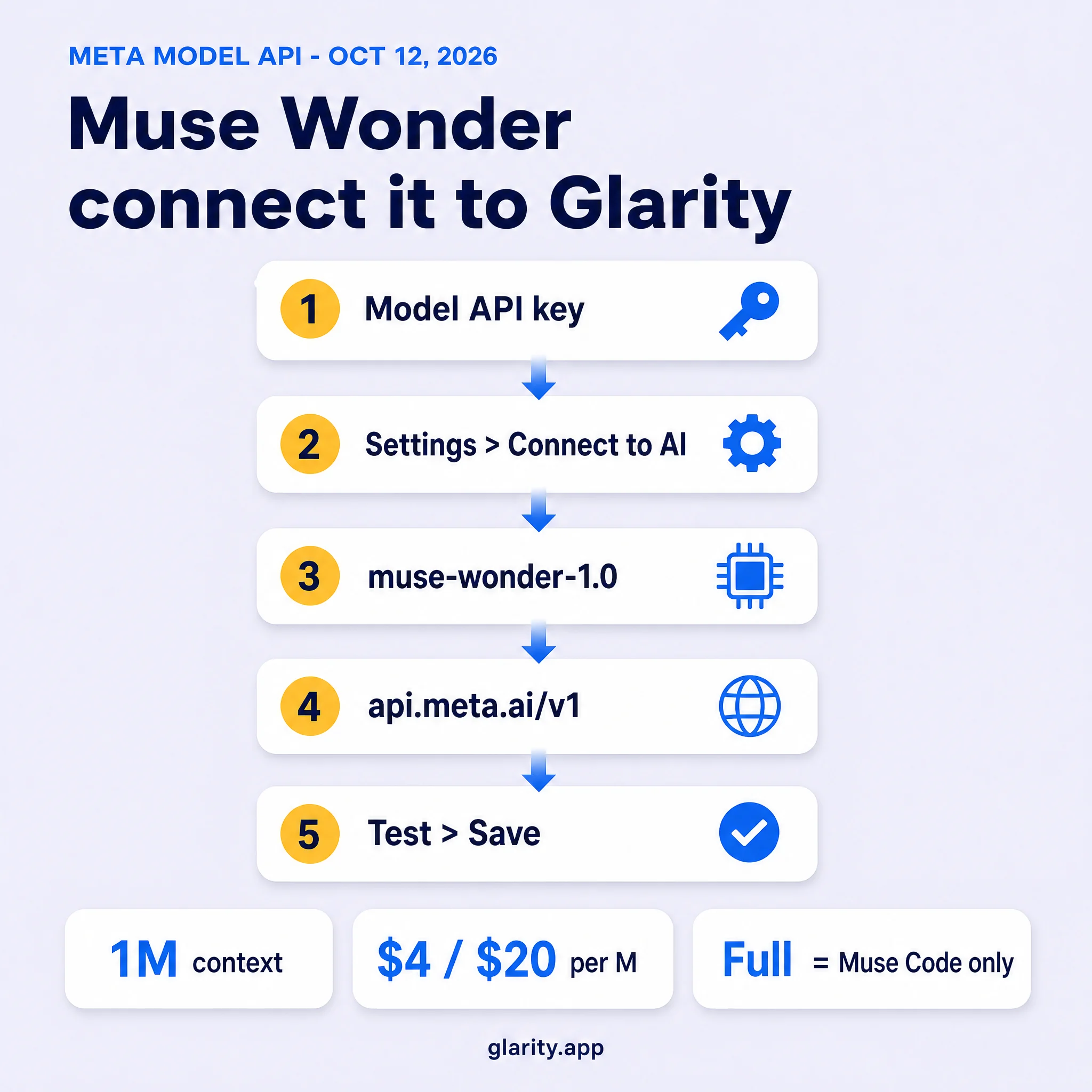
Meta released the Muse Wonder series on October 12, 2026 — its first frontier-class models, built for long-running agent work in law, finance, health, and coding. A day later, you can point Glarity at the connectable one. The route is the same Custom Model setup this blog has used for every model: Glarity's "Connect to AI" accepts any vendor with an OpenAI-style /chat/completions endpoint, and the Meta Model API is explicitly built to be OpenAI-SDK compatible.
Two things differ from earlier guides. First, Meta shipped two checkpoints, and the one on top of the benchmark charts — Muse Wonder Full — has no API at all; it lives only inside Meta's subscription tool, Muse Code. The model you can actually connect is muse-wonder-1.0. Second, the output price is the steepest of any model covered here: $20 per million output tokens. And one setting flips from our older guides: this time, leave Temperature at its default — Meta's own guidance for this API is to leave it unset.
Muse Wonder at a glance
Field | Value |
|---|---|
Model ID |
|
Released | October 12, 2026 — listed as a preview model |
Context window | 1,048,576 tokens (~1M) |
Input → output | Text, image, video, audio, PDF → text |
Reasoning effort |
|
Pricing | $4 / 1M input · $0.20 / 1M cached input · $20 / 1M output |
Rate limits | 3,000 requests per minute · 4M tokens per minute, per team |
Data terms | Standard mode only — prompts and outputs are not used for training |
Details come from Meta's announcement, the model catalog, the model page, and the pricing page. On the benchmark table Meta published alongside the release, the connectable checkpoint scores 52 on the Artificial Analysis Intelligence Index — a point behind Claude Fable 5.1 and GPT-6 Astra (53) and six behind Claude Opus 5.5 (58) — while the subscription-only Full variant scores 56.
Two checkpoints, one API — read the fine print
Meta's announcement leads with state-of-the-art claims for agentic work, and its model page pairs that with a table where Muse Wonder Full tops several agentic and coding benchmarks. That is the checkpoint most of this week's coverage is describing — and it is not connectable. Muse Wonder Full is exclusive to Muse Code subscribers (Power, $50/month, or Maximum, $200/month), with no per-token access anywhere. Setting reasoning effort to max on the API does not select it.
What you can connect is the standard checkpoint, and Meta's own numbers put it in good company: a point off Fable 5.1 and GPT-6 Astra on the combined index, and ahead of them on several agentic rows. Meta also positions the series for expert domains (law, finance, health) and long-horizon tasks, with two features — Active Memory (carrying context across conversations) and Active Focus (persisting through hard tasks and recovering from errors) — that are aimed at agent runtimes. Those features matter much less for a browser extension that sends one well-formed request per page or video; the context window and multimodal input are what a Glarity user actually feels.
Why it fits Glarity
- The window swallows whole documents. 1,048,576 tokens covers an hour-long video transcript or a 300-page book with room to spare — the model reads the beginning and the end in the same pass instead of you stitching section summaries together.
- It reads more than text. Image, video, audio, and PDF input means a chart, a scanned page, or a media file can go straight into the request — useful for the pages where a plain text summary is not enough.
- Standard mode is the privacy default. On the Model API, Muse Wonder runs in Standard mode: Meta states prompts and outputs are not used for training, which matters when the page you are summarizing is your own.
Play to those strengths and the cost below stays small. Reach for it on ordinary short pages and you are paying a frontier-agent price for a job a cheaper model finishes.
Connect it in five steps
- Create a Meta Model API key. Open the Model API dashboard at dev.meta.ai, go to API keys, and click Create API key. Copy it immediately — the dashboard shows it only once. Keys have the form
LLM|…. - Open Glarity → Settings → General, scroll to Connect to AI for quick Glarity summaries and translations, and set Connection type to OpenAI API key — the Meta Model API is drop-in compatible with the OpenAI format.
- Paste your key into the API Key field.
- Set Model to Custom Model and enter
muse-wonder-1.0. Set Model Context Window to the largest preset — the model's real ceiling is about 1M tokens, and the preset is only a safety cap. - Check the connection values — API Host
https://api.meta.ai/v1, API Path/chat/completions— and leave Temperature at its default. Then press Test, confirm a response, and Save.
Settings at a glance
Field | Value | Why |
|---|---|---|
Connection type | OpenAI API key | Meta Model API accepts OpenAI-format requests |
API Key | your Meta key (starts | Created in the Model API dashboard; shown once |
Model | Custom Model → | The API checkpoint — not the Full variant |
Model Context Window | largest preset (~1M) | The documented ceiling is 1,048,576 tokens |
API Host |
| Base URL from Meta's docs |
API Path |
| The OpenAI-compatible route |
Temperature | leave at default | Meta advises leaving it unset — the model is tuned to run there |
What a session really costs
At $4 per million input and $20 per million output, a normal Glarity day is still measured in cents — but the output line is where this model sits above its peers. Same scenarios as our Claude Sonnet 5.5 guide, repriced:
What you feed it | Tokens in | Tokens out | Muse Wonder | Claude Sonnet 5.5 |
|---|---|---|---|---|
1-hour YouTube video → summary | ~12,000 | ~800 | ~$0.06 | ~$0.03 |
30-page report → summary + chat | ~40,000 | ~1,500 | ~$0.19 | ~$0.10 |
300-page book → whole-book summary | ~230,000 | ~3,000 | ~$0.98 | ~$0.49 |
Big research stack (roughly 500K input) | ~500,000 | ~8,000 | ~$2.16 | ~$1.08 |
Two notes on reading that table. Rounded estimates aside, the everyday rows stay trivial — a video summary is six cents — so the honest framing is "about double the per-token cost of a Sonnet-class model," not "expensive." And because Muse Wonder is a reasoning model, its internal thinking is metered as output tokens, the same convention every major AI API follows; a long, hard request bills above what the visible summary suggests. Budget headroom on the heavy rows, and the light rows will take care of themselves.
When to use it — and when to skip
Reach for it on the tasks its window and inputs were built for: multi-hour transcripts, whole books, chart-heavy or scanned pages, media files, and any session where splitting the document across calls would lose the thread.
Skip it for quick, everyday summaries. Our Grok 4.7 and Claude Sonnet 5.5 guides connect models that cost a fraction per token and handle a short video or article just as well; at $20 per million output, this is not the model to leave switched on by default.
One caveat while it is new: Meta lists Muse Wonder as a preview model, so IDs and behavior can still change. Switching back is a one-field edit in the same settings panel — nothing about your setup is one-way.
If something fails
Symptom | Likely cause | Fix |
|---|---|---|
401 / unauthorized | Key mis-pasted, or a key copied half-way (they are shown once) | Create a fresh key in the dashboard and paste it again |
"Model not found" | A guessed or Full-variant ID | Type exactly |
Connection error on Test | An older provider's host or path still in the fields | Host |
429 / rate limit | Team-level limits: 3,000 requests/min, 4M tokens/min | Wait and retry; limits are per team, not per key |
Long request rejected | Input plus requested output exceeds the 1M window | Split the document |
Gateway timeout on very long input | Meta's API returns 504 on long non-streaming runs | Retry, or shorten the job — very heavy requests may need splitting |
Settings not persisting | Save only takes effect after a successful Test | Run Test first, then Save |
FAQ
Is Muse Wonder free to use in Glarity? No — every call bills per token through the Meta Model API. Glarity itself remains free; the token bill is yours, and for everyday summaries it runs a few cents per request.
What is the difference between Muse Wonder and Muse Wonder Full? Full is the higher-scoring checkpoint (56 vs 52 on the Artificial Analysis index) and is subscription-only inside Meta's Muse Code tool, at $50 or $200 per month. It has no API access, so it cannot be connected to Glarity.
Does Glarity officially support Muse Wonder? Not as a named built-in option. This guide connects it through Glarity's generic Custom Model setting — the same mechanism as every other model guide on this blog.
Should I switch from Claude Sonnet 5.5 to Muse Wonder? Only if long context or multimodal input is your bottleneck. Sonnet 5.5 costs about half as much per token and covers the same 1M window; Muse Wonder earns its premium on the longest, hardest reading jobs.
Are my prompts and outputs used to train Meta's models? No. The Model API runs Muse Wonder in Standard mode, and Meta states that prompts and outputs are not used for training. (A discounted "Contributor" mode exists on the platform, but Meta does not offer it for Muse Wonder.)
Do I need a Muse Code subscription or a Meta account? A Meta Model API key and billing for the API — that is all. Muse Code is the subscription tool for the Full variant and for Meta's own agent products; the API route never goes through it.
By the Glarity Editorial Team. The Glarity Editorial Team writes about AI search, video summarization, and getting more out of your browser.
Glarity is a free browser extension for AI search and YouTube summarization — try it at glarity.app.