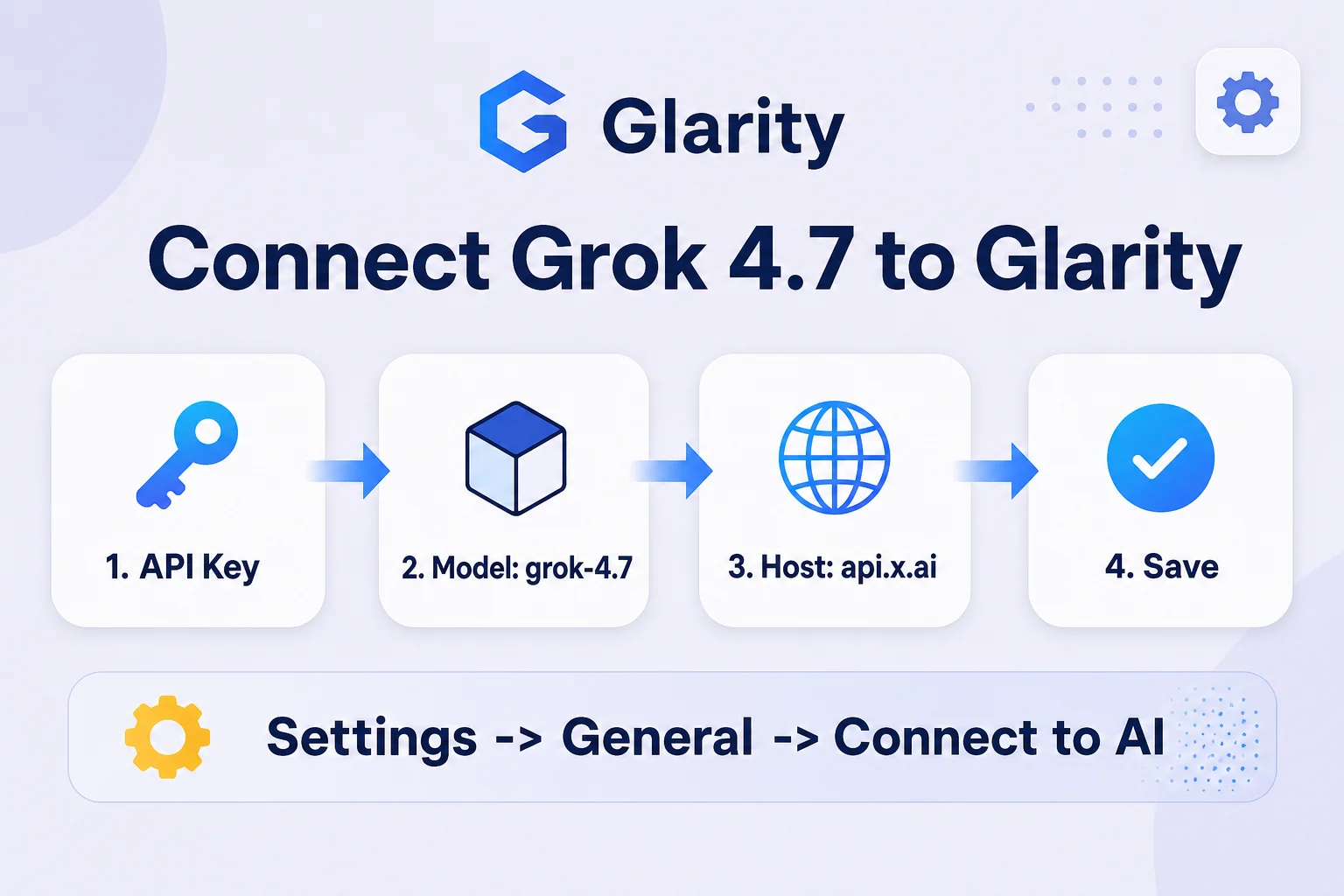
Grok 4.7 is xAI's September 2026 update to its general-purpose model line, positioned as twice as fast and half the price of comparable models, with a 500K-token context window and a May 2026 knowledge cutoff. Glarity's blog already has a guide for Grok 4.3; this one covers the newer sibling. Neither is a named, built-in Glarity option — both connect the same way, through Glarity's generic "Custom Model" setting, which accepts any vendor with an OpenAI-style /chat/completions endpoint. Setup takes about five minutes from Settings → General → Connect to AI.
Why Grok 4.7
xAI built 4.7 for speed and cost as much as capability — it scores higher on coding benchmarks than Grok 4.6 while running faster, and a higher-speed variant is available at double output speed for double the price. For a browser extension that calls the model on every page or video you ask it to summarize, that speed-per-dollar tradeoff matters more than chasing the highest benchmark score. The 500K-token context also comfortably covers long articles or video transcripts that would strain smaller-context models.
What you need before you start
- An API key from the xAI console (console.x.ai)
- The connection values below
Configure Glarity step by step
- Open the Glarity extension and go to Settings → General, then scroll to Connect to AI for quick Glarity summaries and translations.
- Set Connection type to OpenAI API key.
- Paste your xAI key into API Key.
- Set Model to Custom Model and enter
grok-4.7. - Set Model Context Window to the preset nearest 500,000.
- Set API Host to
https://api.x.ai/v1. - Set API Path to
/chat/completions. - Set Temperature to 0.5 for general use (0.2 for literal summaries), click Test, confirm a response, then Save.
Settings at a glance
Field | Value | Meaning |
|---|---|---|
Connection type | OpenAI API key | Grok's API speaks the OpenAI chat-completions format |
API Key | your xAI key | Issued from the xAI console |
Model | Custom Model → | Official model ID (aliases like |
Model Context Window | ~500,000 | Grok 4.7's documented context limit |
API Host |
| Base URL from xAI's API docs |
API Path |
| Standard OpenAI-compatible route |
Temperature | 0.5 (or 0.2) | Balance between natural phrasing and literal output |
Pricing, with a long-input note
Below 200K prompt tokens, xAI charges $2 per 1M input tokens (plus a lower cached-input rate) and $6 per 1M output tokens — the same rates as Grok 4.6. Cross the 200K-token threshold in a single request and the whole request bills at the higher tier: $4 per 1M input, $12 per 1M output. That threshold matters more for Grok 4.7 than for smaller-context models, since its 500K window makes it easy to send a very long page or transcript in one call. Normal Glarity use — a page or video summary — stays well under the threshold and well under a dollar.
What a Grok-powered Glarity can do
Capability | How it behaves now |
|---|---|
Translation | Translates page text or selections |
Page summary | Condenses long articles into key points |
YouTube summary | Summarizes video transcripts, including long uploads within the 500K window |
Video subtitles | Generates and translates subtitle text from transcript input |
Quick email reply | Drafts short replies from selected text |
One-click prompts | Runs your saved custom prompts against Grok 4.7 instead of the default model |
Troubleshooting
- 401 / unauthorized error — your API key is invalid or wasn't saved; re-paste it and click Test again before Save.
- "Model not found" — check that Model is set to Custom Model with the exact ID
grok-4.7, not a retired or guessed name. - Unexpectedly high cost — you likely crossed the 200K-token threshold in one request, which bills the entire request at the higher rate; split very long input across calls if this matters.
- Peak-time slowness — try again shortly, or use the faster (higher-price) variant if latency matters more than cost.
- Settings not persisting — Save only takes effect after Test succeeds; a Test alone doesn't save your changes.
FAQ
Is Grok 4.7 officially supported by Glarity? No — Glarity doesn't list Grok 4.7 as a built-in option. This guide connects it through Glarity's generic Custom Model setting, the same mechanism used for Grok 4.3 or any other OpenAI-compatible vendor.
How does this differ from Glarity's Grok 4.3 guide? The setup steps are identical — only the model ID, context window, and pricing change. Grok 4.7 adds a larger 500K context window and updated speed/price positioning over 4.3.
What's the actual cost for typical use? For a page or video summary well under 200K tokens, you're paying $2 per 1M input and $6 per 1M output tokens — a few thousand tokens per call costs a small fraction of a cent.
Can I use the faster variant instead? Yes — xAI offers a higher-speed configuration at double output speed for double the price; check xAI's docs for its specific model ID if you want to swap it in.
Is the Test button required every time? Only after you change a setting. Once saved, Glarity keeps using that configuration until you edit it again.
By the Glarity Editorial Team. The Glarity Editorial Team writes about AI search, video summarization, and getting more from your browser.
Glarity is a free browser extension for AI search and YouTube summarization — try it at glarity.app.