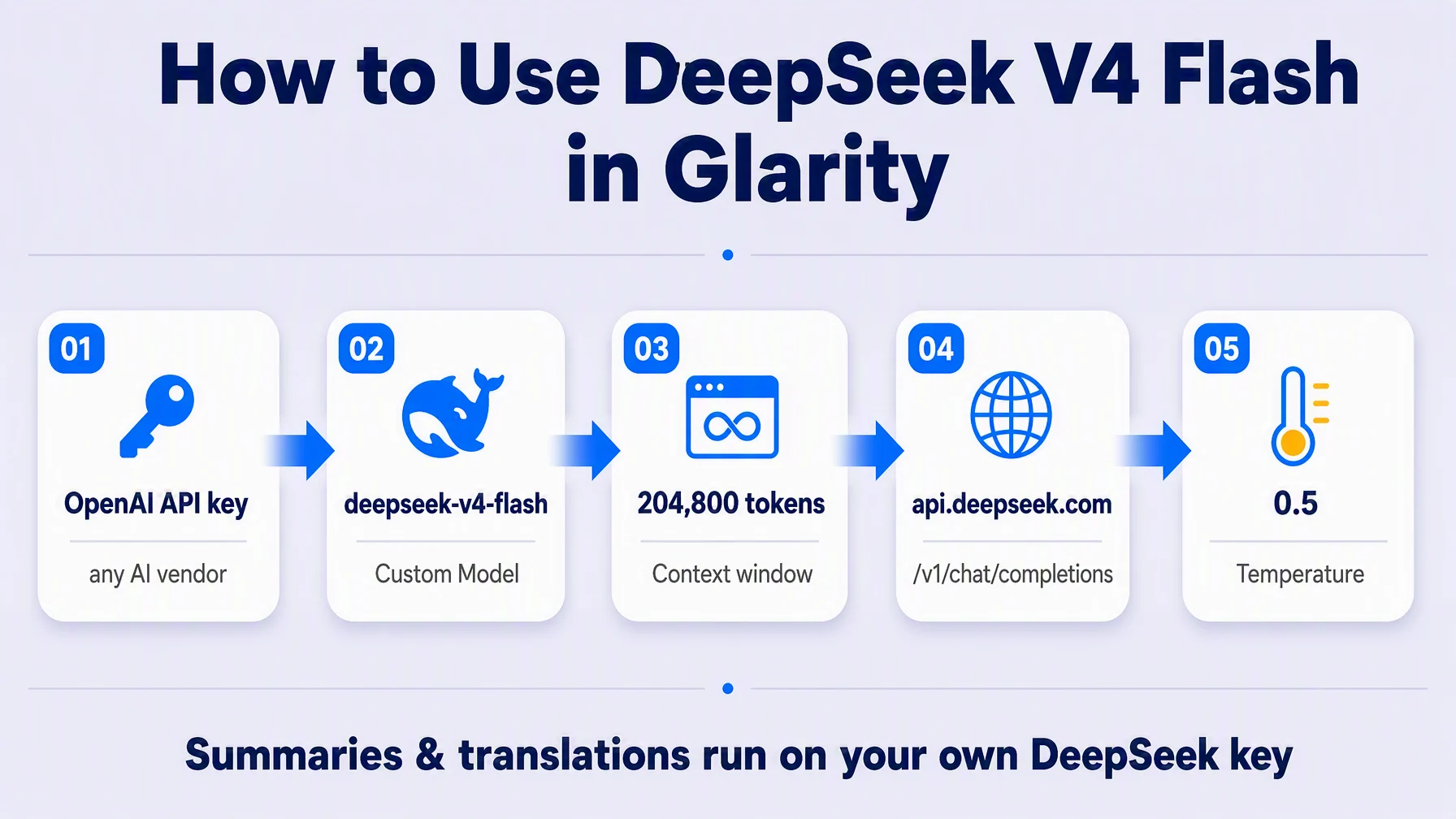
You can run Glarity on DeepSeek's V4 Flash model in five minutes: open Settings → General, choose OpenAI API key (it accepts custom keys from any AI vendor), paste your DeepSeek key, and fill in the model, context window, API host, path, and temperature. Once connected, page translation, page summaries, and YouTube video summaries all run through your own DeepSeek endpoint.
Why connect your own DeepSeek V4 Flash key
Glarity's built-in "Glarity (Recommended for All Users)" option gives you 20,000 free tokens per day. That is plenty for casual use, but a custom API key removes the daily cap: your DeepSeek account bills the usage directly, and Glarity's summaries and translations keep running as long as your key does.
DeepSeek V4 Flash is a fast, low-cost model with a large context window, which makes it a good fit for the long inputs Glarity handles — full web pages, articles, and hour-long video transcripts. The exact model ID is deepseek-v4-flash.
What you need before you start
- A DeepSeek account and API key from the official console at platform.deepseek.com (official DeepSeek platform — API keys are created there; the model is billed by DeepSeek on usage).
- The four connection values shown in this guide (model, context window, host, path) — every one of them is visible in the screenshot below.
Configure Glarity step by step
Open the Glarity settings window, go to General, and scroll to Connect to AI for quick Glarity summaries and translations. This page is where every AI service key lives.
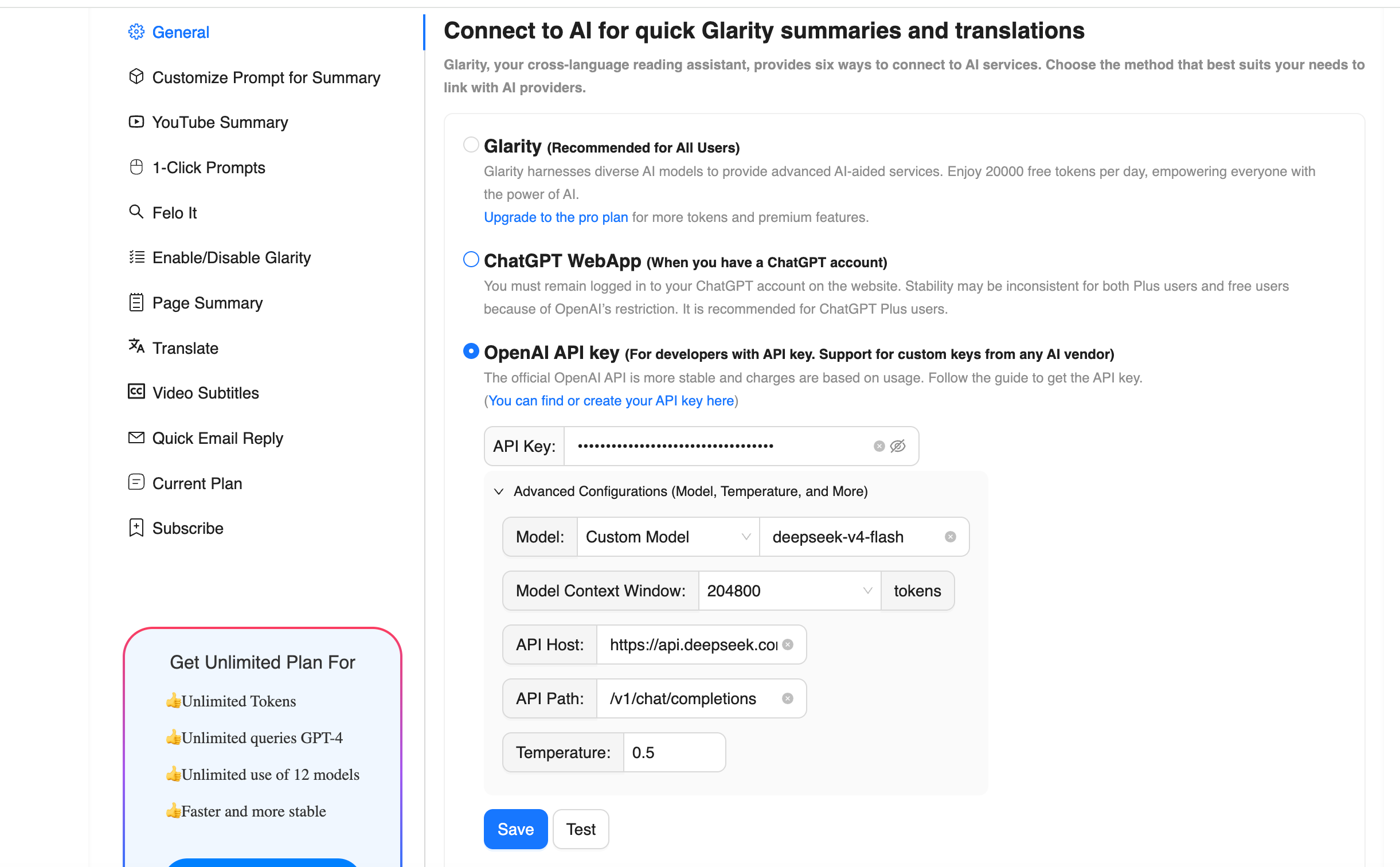
- Pick "OpenAI API key" — the third option on the page, labeled "Support for custom keys from any AI vendor". This is the one that accepts DeepSeek.
- Paste your DeepSeek API key into the API Key field.
- Model — choose Custom Model from the dropdown and type
deepseek-v4-flash. (If you later want a different model, this is where you change it — a DeepSeek key also works withdeepseek-v4-pro.) - Model Context Window — select 204800 tokens. This is the window the extension tells the model to use; it comfortably covers full-page summaries and long video transcripts. (DeepSeek's own API supports up to 1M tokens, so you can raise this later if Glarity's menu offers it.)
- API Host — enter
https://api.deepseek.com(DeepSeek's official OpenAI-compatible endpoint). - API Path — enter
/v1/chat/completions. (DeepSeek's docs sample the same OpenAI-compatible endpoint as/chat/completions; both work because DeepSeek follows OpenAI's API format — the values in the screenshot are the tested combination.) - Temperature — set 0.5. This default keeps summaries grounded and reproducible; raise it if you want more varied phrasing.
- Click Test to verify the connection, then Save to activate it for every Glarity summary and translation feature.
The settings at a glance
Field | Value | Why |
|---|---|---|
Connection | OpenAI API key | Custom keys from any vendor, OpenAI-compatible |
Model | Custom Model — | DeepSeek's fast low-cost model ID |
Model Context Window | 204800 tokens | Fits long pages and full video transcripts |
API Host |
| Official DeepSeek API base URL |
API Path |
| OpenAI-compatible chat completion route |
Temperature | 0.5 | Balanced, grounded output |
What this unlocks
With the key saved, every Glarity capability routes through DeepSeek V4 Flash:
Capability | What it does now |
|---|---|
Translate | Immersive page translation and side-by-side subtitles — the same feature set covered in our bilingual subtitle tutorial |
Page Summary | Summaries, key points, and follow-up questions for any web page |
YouTube Summary | Transcript-based summaries with timestamped highlights, key points, and an FAQ for any video |
Video Subtitles | Generate and translate video subtitles in your language |
Quick Email Reply | Drafted replies in the tone and language you need |
1-Click Prompts | Favorite tasks run again on your own model |
Cost and context notes
DeepSeek bills usage; the official pricing page lists V4 Flash at round $0.22–0.44 per 1M input tokens (cache miss) and $0.66–1.32 per 1M output tokens, with off-peak and peak rates — check the official pricing page for current numbers. Typical Glarity requests (one page summary, one video transcript) are a small fraction of a million tokens, so day-to-day use is usually cents — but your balances and limits are under your DeepSeek account, not Glarity's.
Troubleshooting
- Test fails with 401 / "invalid key" — the API key is wrong, expired, or copied with spaces. Recreate it on platform.deepseek.com and paste again.
- Test fails with payment or balance errors — your DeepSeek account needs a top-up; the model is billed against your account.
- "Model not found" — the model string is off. Use
deepseek-v4-flashexactly; the docs note the model has been updated (V4-Flash-0731) but the caller string staysdeepseek-v4-flash. - Slow or interrupted responses — a 429 rate limit or concurrency peak on DeepSeek's side; retry or wait, the connection itself is fine.
- Nothing changed after saving — make sure you clicked Save after Test; the connection activates per settings window.
FAQ
Does DeepSeek also power translations, or only summaries? Both. The "Connect to AI" page covers Glarity's quick summaries and translations — Web page translation, selected text, and video subtitle translation all use the same connected model.
Is this free? You keep Glarity's free 20,000 tokens/day built-in option if you don't connect a key. Once you connect your DeepSeek key, usage is billed by DeepSeek (pay-as-you-go on your account) — see the official pricing page for rates.
Why a custom model instead of "Glarity" in the dropdown? The built-in Glarity option includes a free daily token allowance. The custom key route is for when you want your own provider, your own budget, no daily cap — or simply a model you already know.
Can I swap models later without a new key? Yes. The same key works with any DeepSeek model (for example deepseek-v4-pro), you just change the Model field, and if you connect a different OpenAI-compatible vendor later, you would update the host and path too.
Do I have to run the connection test? No, but it is the fast way to catch a typo in the host, path, or model ID before you start using summaries.
By the Glarity Editorial Team. The Glarity Editorial Team writes about AI search, video summarization, and getting more from your browser.
Glarity is a free browser extension for AI search and YouTube summarization — try it at glarity.app.