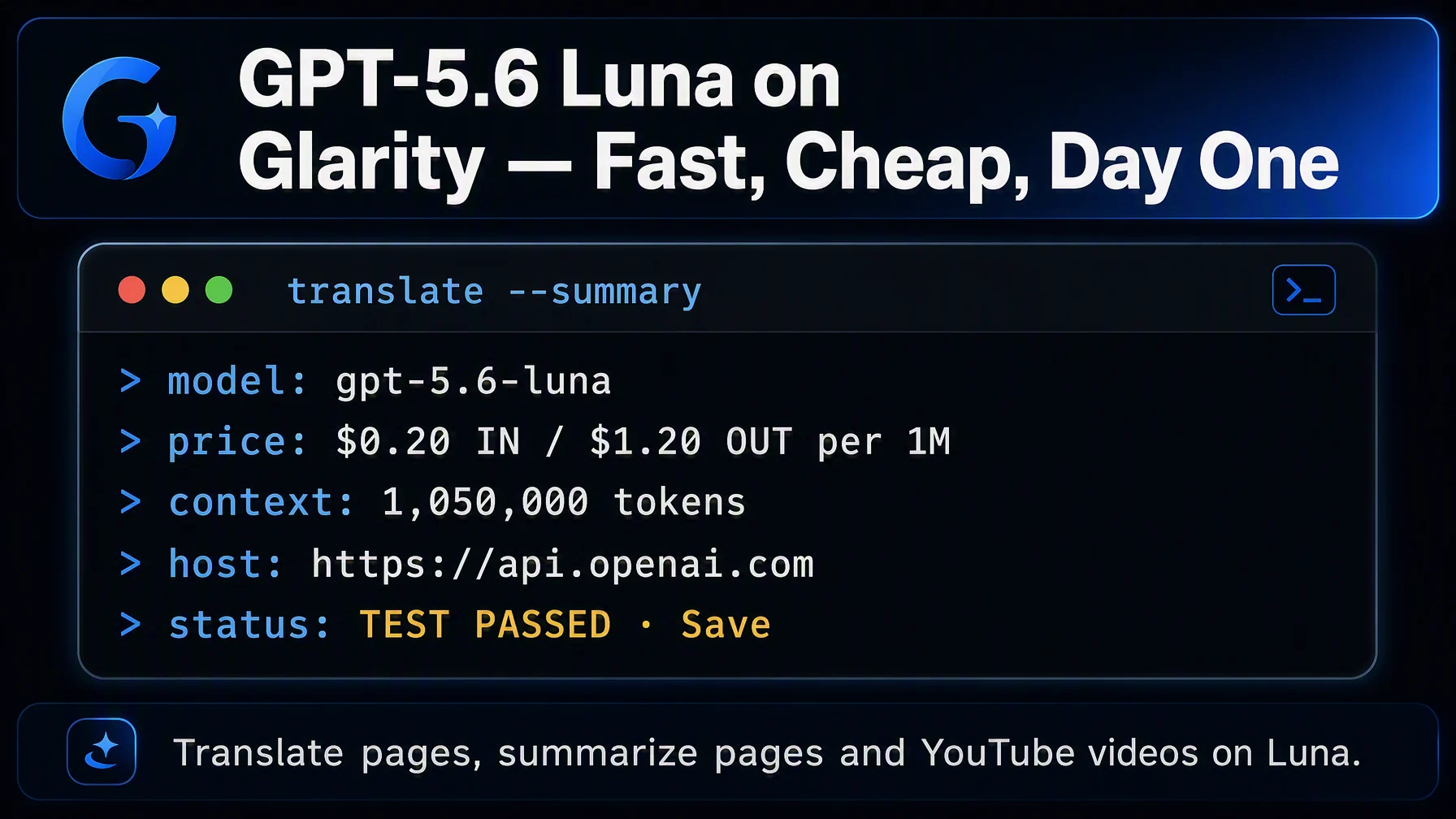
Getting GPT-5.6 Luna working inside Glarity takes about five minutes: in Settings → General, choose OpenAI API key ("Support for custom keys from any AI vendor"), paste a key from platform.openai.com, then enter the model name, context window, API host and path. After you save, page translation, page summaries and YouTube video summaries all run through Luna — the fastest and least expensive model in OpenAI's GPT-5.6 family.
Why connect your own GPT-5.6 Luna key
Glarity's built-in "Glarity (recommended for all users)" option includes a free daily allowance, but a custom key removes the daily cap: your usage is billed to your own OpenAI account, and summaries and translations keep working as long as the key does.
Luna is the cost-efficient tier of GPT-5.6 (Sol is the flagship, Terra sits in the middle). It is built for high-volume, latency-sensitive work — exactly what an extension does dozens of times a day — and it speaks the same Chrome-extension request format Glarity already uses.
What you need before you start
- A key from platform.openai.com (the official OpenAI platform — usage is billed there, on your account).
- The four connection values in this article: model, context window, host and path.
Configure Glarity step by step
Open the Glarity settings window, go to General, and scroll to Connect to AI for quick Glarity summaries and translations. This page manages all AI service keys.
- Select "OpenAI API key" — the third option on the page, described as "Support for custom keys from any AI vendor."
- Paste your OpenAI API key into the API Key field.
- Model — choose Custom Model from the dropdown and enter
gpt-5.6-luna. (You can always switch this field later — the same key works for other GPT-5.6 models such asgpt-5.6-terra.) - Model Context Window — pick the preset closest to 1,050,000 tokens, which is Luna's official context window. This is how much of a page or transcript you hand the model at once; the preset is a guide, not a hard limit.
- API Host —
https://api.openai.com(the official OpenAI API base). - API Path —
/v1/chat/completions(the standard Chat Completions route, which OpenAI's docs mark as supported for this model). - Temperature — 0.5. A stable, reproducible middle value for summaries; raise it if you want more varied phrasing.
- Click Test to verify the connection, then Save.
One cost note: while Luna's official window is 1,050,000 tokens, requests with more than 272,000 input tokens are billed at 2× input and 1.5× output for the whole request. A very long article transcript is worth splitting if you notice costs creeping up.
Settings at a glance
Field | Value | Meaning |
|---|---|---|
Connection | OpenAI API key | Custom keys from any AI vendor |
Model | Custom Model — | Fast, cost-efficient GPT-5.6 tier |
Model Context Window | 1,050,000 tokens (preset as available) | Official context window |
API Host |
| OpenAI official API base |
API Path |
| Standard OpenAI Chat Completions route |
Temperature | 0.5 | Stable, reproducible output |
Pricing in practice
Per OpenAI's model docs (as of August 2026): $0.20 per 1M input tokens and $1.20 per 1M output tokens, with cached input at $0.02 per 1M. A single Glarity request — summarizing one page, or one YouTube transcript — is a small fraction of a million tokens, so everyday use is usually a fraction of a cent up to a few cents, depending on length. Check the official model docs and pricing page for current numbers.
What a Luna-powered Glarity can do
Capability | How it behaves now |
|---|---|
Translation | Immersive full-page translation and side-by-side subtitles — see the bilingual subtitle tutorial |
Page summary | Summaries, key points and follow-up questions for any page |
YouTube summary | Timestamped highlights, key points and FAQ built from the transcript |
Video subtitles | Subtitles generated and translated into your language |
Quick email reply | Drafts in the tone and language you want |
One-click prompts | Saved tasks re-run on your own model |
Troubleshooting
- Test returns 401 / "invalid key" — the key is wrong, expired or has stray spaces. Recreate it at platform.openai.com and paste again.
- "model not found"-style errors — the model name is mistyped. Use
gpt-5.6-lunaexactly (note the dots). - Slow at first, then fine — OpenAI-side load varies; retry after a moment, the connection itself is fine.
- Billing looks higher than expected — check whether inputs exceeded 272,000 tokens (billed at the long-context rate) or whether caching writes got involved; the details are on the official pricing page.
- Nothing changes after saving — confirm you pressed Save after Test; the connection applies per settings window.
FAQ
Is Luna good enough for translation, or should I use a bigger model? For page and transcript length, Luna does the job well and is the cheapest tier of GPT-5.6 that still runs the newest OpenAI stack. If a specific document needs more nuance, you can switch the Model field to gpt-5.6-terra without changing anything else.
Does it work for both translation and summaries? Yes. The "Connect to AI" page covers Glarity's quick summaries and translations — page translation, selection translation and subtitle translation all pass through the connected model.
Is it free? Without a key, Glarity's built-in allowance stays in place. With your own key, OpenAI bills you per usage — see the official pricing page.
Why use a custom model instead of the "Glarity" option in the dropdown? The built-in option has a daily free allowance. A custom key is for people who want to pick their own vendor, manage their own budget and run without a daily cap.
Do I have to run the connection test? Not strictly — but it catches a mistyped model name, host or path in seconds, so it's worth it.
Glarity's editorial team covers AI search, video summaries, and browser productivity tips.
Glarity is a free browser extension that supports AI search and YouTube video summaries, available at glarity.app.